Skip to content
Hosting Reviews Co, Web Hosting Reviews,
  • Home
  • Best Hosting by User
    • Agencies
    • Beginners
    • Developers
      • Woocommerce
    • Enterprise
    • Small Business
      • Wordpress
  • Best Hosting by CMS
    • WordPress
    • WooCommerce
    • Joomla
    • Drupal
    • Magento
    • Laravel
  • Best Hosting by Plan
    • Overall
    • Domain Name
    • Shared
    • Managed
      • WordPress Managed
      • Joomla Managed
      • Fully Managed
    • VPS
    • Dedicated
    • Cloud
  • Hosting Reviews
    • All Reviews
    • A2 Hosting
    • Bluehost
    • Dreamhost
    • Cloudways
    • Flywheel
    • HostGator
    • Hostinger
    • HostPapa
    • IONOS
    • Kinsta
    • KnownHost
    • Network Solutions
    • SiteGround
    • Web.com
    • WP Engine
  • Comparison
    • Bluehost vs Dreamhost
    • Bluehost vs Hostinger
  • Company
    • About Us
    • Blog
Hosting Reviews Co, Web Hosting Reviews,
  • Home
  • Best Hosting by User
    • Agencies
    • Beginners
    • Developers
      • Woocommerce
    • Enterprise
    • Small Business
      • Wordpress
  • Best Hosting by CMS
    • WordPress
    • WooCommerce
    • Joomla
    • Drupal
    • Magento
    • Laravel
  • Best Hosting by Plan
    • Overall
    • Domain Name
    • Shared
    • Managed
      • WordPress Managed
      • Joomla Managed
      • Fully Managed
    • VPS
    • Dedicated
    • Cloud
  • Hosting Reviews
    • All Reviews
    • A2 Hosting
    • Bluehost
    • Dreamhost
    • Cloudways
    • Flywheel
    • HostGator
    • Hostinger
    • HostPapa
    • IONOS
    • Kinsta
    • KnownHost
    • Network Solutions
    • SiteGround
    • Web.com
    • WP Engine
  • Comparison
    • Bluehost vs Dreamhost
    • Bluehost vs Hostinger
  • Company
    • About Us
    • Blog
Hosting Reviews Co. Blog Cloudways Cloudways Signup: A Step-by-Step Guide
Cloudways

Cloudways Signup: A Step-by-Step Guide

  • by Hosting Reviews Co.
  • June 5, 2024
  • Views 2308

Table of Contents

Toggle
  • Introduction:
    • Step 1: Visit the Cloudways Website:
    • Step 2: Click on “Get Started Free”:
    • Step 3: Fill Out the Sign-Up Form:
    • Step 4: Verify Your Email:
    • Step 5: Set Up Your Account:
    • Step 6: Choose Your Cloud Provider and Server Specifications:
    • Step 7: Launch Your Server:
    • Step 8: Start Deploying Applications:
  • Conclusion:

Introduction:

Cloudways provides a user-friendly platform for managed cloud hosting, making it easy for users to deploy and manage applications. If you’re ready to sign up for Cloudways, this step-by-step guide will help you navigate the signup process and start on the platform.

Step 1: Visit the Cloudways Website:

Navigate to the Cloudways website.

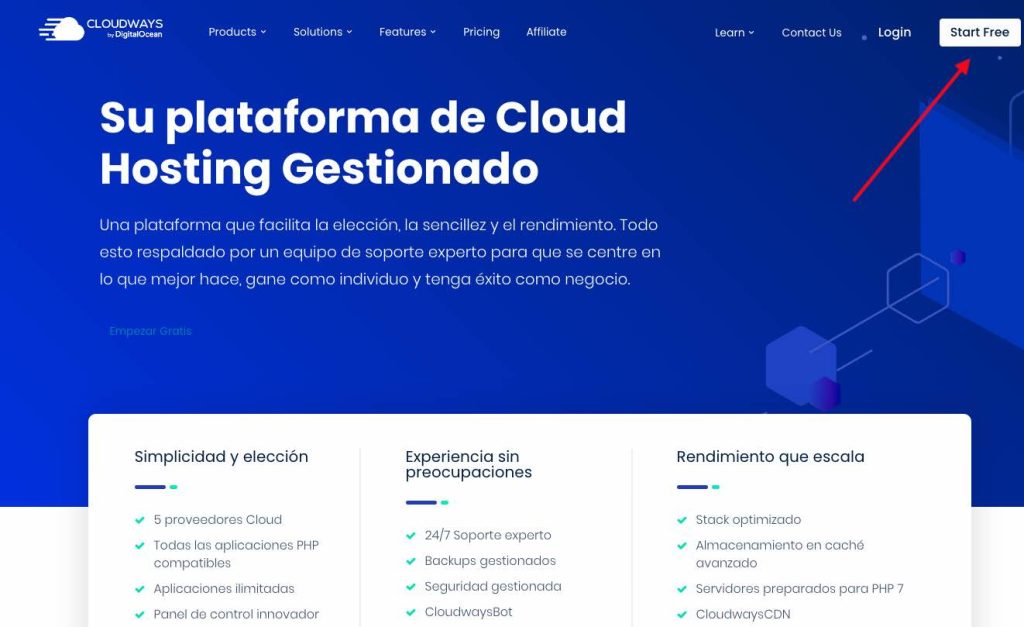
Step 2: Click on “Get Started Free”:

On the Cloudways homepage, click the button “Get Started Free” located at the top right corner.
cloudways signup, cloudways sign up, cloudways create a new account
Screenshot

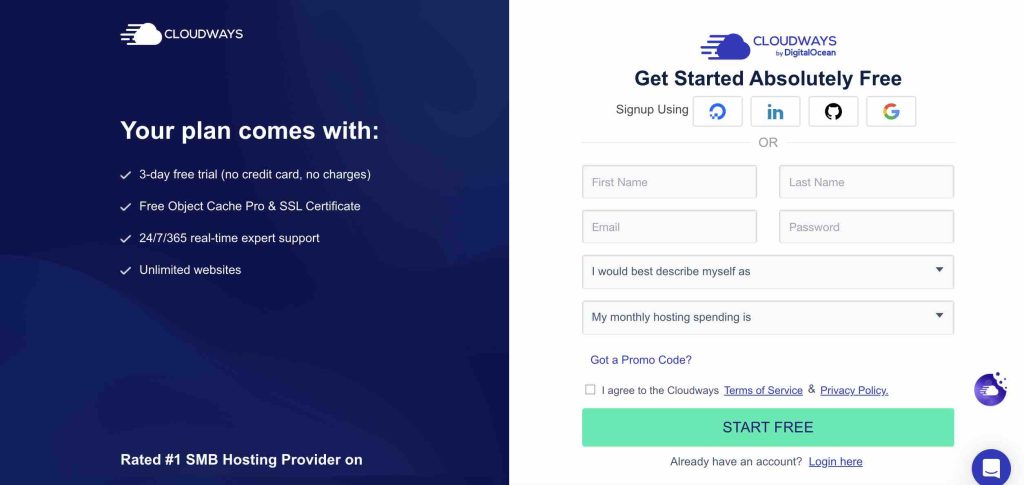
Step 3: Fill Out the Sign-Up Form:

Enter your email address, password, and the name of your desired Cloudways server in the sign-up form.
cloudways signup, cloudways sign up, cloudways create a new account
Screenshot

You can also choose to sign up using your Google, LinkedIn, or GitHub account for added convenience.

Step 4: Verify Your Email:

Once you’ve filled out the sign-up form, Cloudways will send a verification email to the address you provided.

Check your email inbox and click on the verification link to verify your email address.

Step 5: Set Up Your Account:

After you verify your email, Cloudways will redirect you to the platform to set up your account.

Provide additional details such as your name, company name (if applicable), and contact information.

Step 6: Choose Your Cloud Provider and Server Specifications:

Select your preferred cloud infrastructure provider from options like AWS, Google Cloud Platform, DigitalOcean, Linode, or Vultr.

  • AWS (Amazon Web Services): AWS is one of the largest and most comprehensive cloud platforms globally, offering a wide range of services, including computing power, storage, databases, and more. It provides scalability, flexibility, and reliability, making it suitable for businesses of all sizes.
  • Google Cloud Platform: Google Cloud Platform offers a suite of cloud computing services, including computing, storage, machine learning, and data analytics. It emphasizes scalability, security, and innovation, with a global network infrastructure designed to deliver high performance and low latency.
  • DigitalOcean: DigitalOcean has a reputation for its simplicity and developer-friendly approach. It offers cloud computing services, such as virtual servers (droplets), managed databases, and object storage, with transparent pricing and straightforward management tools.
  • Linode: Linode provides cloud hosting services with a focus on simplicity, performance, and customer service. It offers virtual servers (Linodes) with flexible configurations, predictable pricing, and a user-friendly control panel.
  • Vultr: Vultr offers high-performance cloud infrastructure services, including compute instances, block storage, and dedicated cloud compute instances. It emphasizes simplicity, reliability, and cost-effectiveness, with global data centers and flexible pricing options.

Choose your server specifications, including server size, location, and operating system.

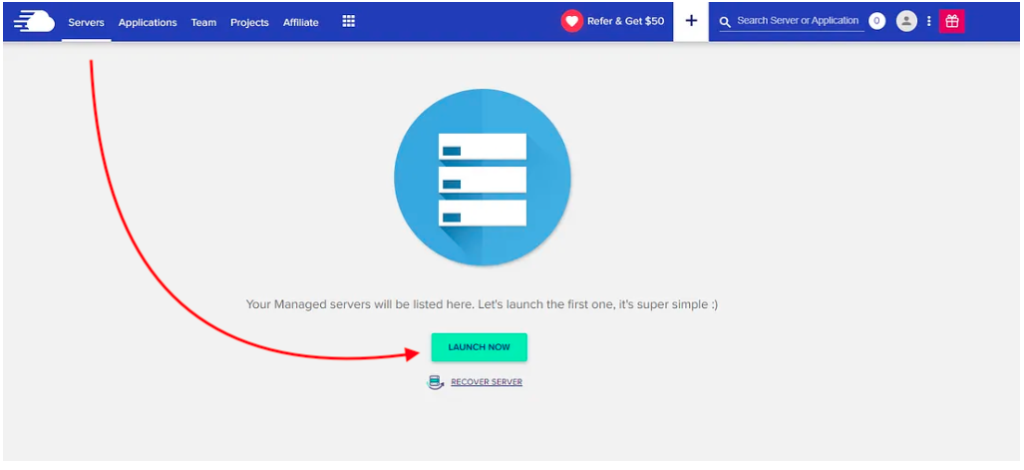
Step 7: Launch Your Server:

Review your server configuration and click on the “Launch Now” button to deploy your Cloudways server.
cloudways signup, cloudways sign up, cloudways create a new account

Cloudways will provision your server and provide you with access to the platform’s intuitive control panel.

Step 8: Start Deploying Applications:

Once you deploy your server, you can start deploying applications such as WordPress, Magento, Joomla, Drupal, Laravel, and more.

Use the Cloudways control panel to manage your applications, monitor server performance, and access additional features and services.

Conclusion:

Signing up for Cloudways is quick and easy, allowing you to deploy and manage cloud servers and applications with minimal hassle. By following this step-by-step guide, you can start on Cloudways and effectively develop and expand your online projects using its robust features and managed hosting services. Visit the Cloudways website today and start your cloud hosting journey with confidence.

For more information, check out our Cloudways Review or visit the Cloudways website.

Tags:

cloudways create accountcloudways create new accountcloudways new accountcloudways signup

Share This Post:

Facebook Twitter Youtube LinkedIn Pinterest
Previous Post

Migrate An Existing Website to Cloudways

Next Post

Cloudways Payment Methods Available Now

You May Also Like

Cloudways

Is Cloudways Shared Hosting?

  • by Hosting Reviews Co.
  • September 26, 2024
  • Views 1816
Cloudways

Is Cloudways Free?

  • by Hosting Reviews Co.
  • September 26, 2024
  • Views 1908
Cloudways

Is Cloudways Good? A Comprehensive Review

  • by Hosting Reviews Co.
  • June 17, 2024
  • Views 2101
Cloudways

How to Point a Domain to Cloudways

  • by Hosting Reviews Co.
  • June 17, 2024
  • Views 2179
Cloudways

Cloudways Trial Period: A Complete Guide

  • by Hosting Reviews Co.
  • June 16, 2024
  • Views 2162

Leave feedback about this Cancel Reply

  • Quality
  • Price
  • Service

PROS

+
Add Field

CONS

+
Add Field

Search

Top Reviews

Softaculous Joomla: Why use it?

What Is a WordPress Developer?

Free Joomla Hosting

cPanel for Joomla Websites

Categories

  • A2 Hosting
  • Bluehost
  • Build a Website
  • Cloud Hosting
  • Cloudways
  • Control Panel
  • CPanel
  • Developers
  • DigitalOcean
  • Domain Name
  • DreamHost
  • Enterprise Hosting
  • Fast Hosting
  • Flywheel Web Hosting
  • GreenGeeks
  • HostGator
  • Hosting Australia
  • Hostinger
  • InMotion Hosting
  • Joomla Hosting
  • Laravel Hosting
  • LiteSpeed
  • Local Hosting
  • SEO
  • SiteGround
  • Softaculous
  • Web Hosting
  • Web Hosting Industry Trends
  • Web Hosting Reviews
  • Website Security
  • Website Traffic
  • WP Engine

Recent Posts

  • What Is a WordPress Developer?
  • What Is SSL Certificate?
  • What Is Secure Socket Layer Protocol?
  • How Edge Computing Shapes Enterprise Hosts
  • How to Build a Website Using WordPress?

Recent Comments

  1. Anja G. on Hostinger
  2. Frank H. on Hostinger
  3. Marie C. on Bluehost
  4. Colin O. on Bluehost
  5. Adam M. on Hostinger

Archives

  • June 2025
  • May 2025
  • April 2025
  • March 2025
  • February 2025
  • January 2025
  • December 2024
  • November 2024
  • October 2024
  • September 2024
  • August 2024
  • June 2024
  • May 2024

Categories

Table of Contents

×
  • Introduction:
    • Step 1: Visit the Cloudways Website:
    • Step 2: Click on “Get Started Free”:
    • Step 3: Fill Out the Sign-Up Form:
    • Step 4: Verify Your Email:
    • Step 5: Set Up Your Account:
    • Step 6: Choose Your Cloud Provider and Server Specifications:
    • Step 7: Launch Your Server:
    • Step 8: Start Deploying Applications:
  • Conclusion:
→ Index